



Quick Answer: A Kafka topic is a named stream where related events are stored. Producers write records to the topic, while consumers read them. Each topic can be divided into partitions, which help Apache Kafka store large amounts of data and process several records at the same time.
Introduction
Imagine someone places an order on an online store. That one action may need to update inventory, start payment processing, send an email and inform the delivery system. Connecting every service directly would soon become messy. Apache Kafka provides a central place where the order event can be published and read by the services that need it.
That central place is called a Kafka topic. It’s one of the first ideas you need to understand when learning Kafka. In this blog post, you’ll learn what a Kafka topic is, how records move through it and why partitions, offsets and consumer groups matter.
How Does a Kafka Topic Work?
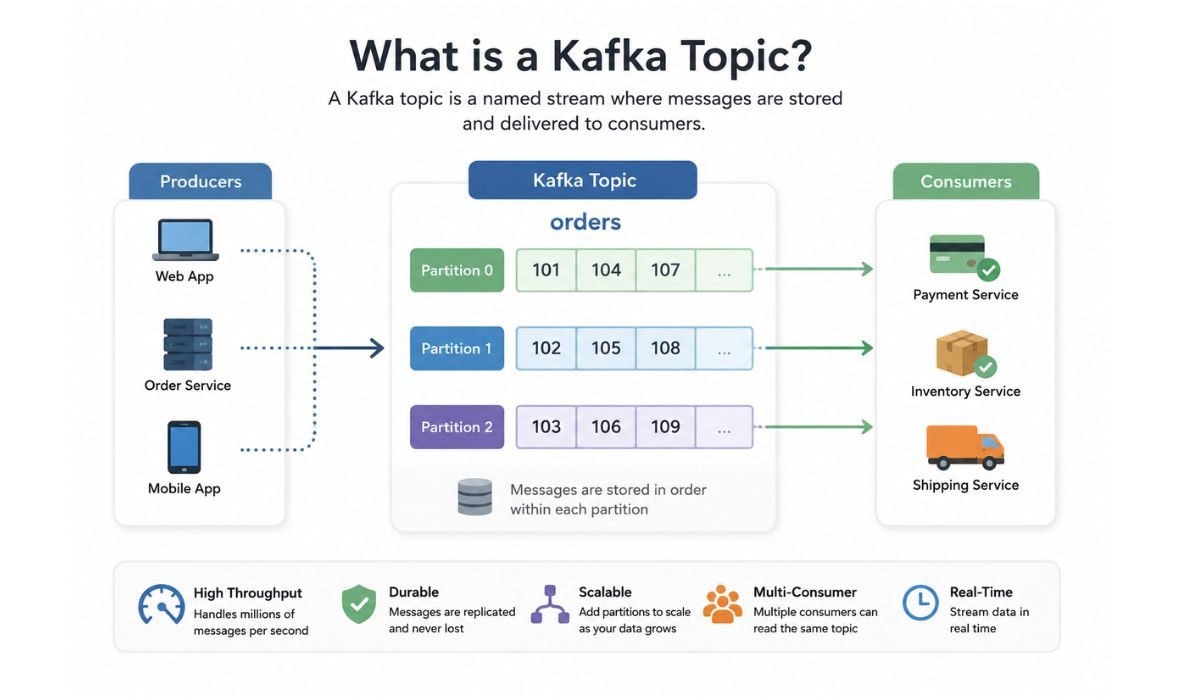

A Kafka topic groups events that belong to the same type of activity. An online store might have separate topics named orders, payments, shipments and customer-notifications. Keeping these events separated helps applications subscribe only to the information they need.
A producer sends a record to a topic inside a Kafka cluster. Kafka stores that record on one of its brokers. Consumers can then subscribe to the topic and read the event. Reading it doesn’t normally remove it. Kafka keeps the record until the topic’s retention rules say it should be deleted.
Here’s how an order event may move through Kafka:
- A customer places an order on the website.
- The store application creates an order-created event.
- A Kafka producer writes the event to the orders topic.
- Kafka stores it inside one of the topic’s partitions.
- Payment, inventory and email consumers read the event.
- Each service performs its own work without directly contacting the store application.
This setup keeps services separate. If the email service goes offline for a short time, the order service can still publish events. The email service can continue reading from its previous position after it returns.
Main Parts of a Kafka Topic
A topic is more than a named container. It has several parts that control how records are stored, ordered and read.
| Component | Simple Meaning | Why It Matters |
|---|---|---|
| Record | One event stored in Kafka | Carries the actual information |
| Key | An optional identifier | Helps place related records in the same partition |
| Value | The main record data | May contain order, payment or user details |
| Timestamp | Time connected to the event | Helps track when the event happened |
| Partition | One part of a topic | Supports scaling and parallel processing |
| Offset | Record position in a partition | Helps consumers track reading progress |
| Broker | A Kafka server | Stores partitions and handles requests |
| Replication factor | Number of partition copies | Helps protect data if a broker fails |
A record may also contain headers with extra details. For example, a header could carry a request ID used to trace one order across several services. That’s useful, but it isn’t required for understanding the basic topic flow.
Partitions
Kafka splits topics into partitions. You can think of each partition as its own ordered log of records. A topic with three partitions has three separate logs that Kafka can spread across brokers and consumers.
Partitions make Kafka faster because several consumers can process records at the same time. There is one detail people often miss, though. Kafka keeps record order inside a single partition. It doesn’t promise one complete order across every partition in the topic.
A record key helps decide where a record goes. If customer ID 502 is used as the key, records with that same key will normally reach the same partition. This is useful when events for one customer or order must remain in order.
Offsets
Every record receives a number called an offset within its partition. The first record might have offset 0, followed by offsets 1, 2 and 3. An offset is only unique inside that partition, so partition 0 and partition 1 can both have a record at offset 5.
Consumers use offsets to track their progress. If a consumer has finished offset 12, it can later continue from the next available record. Different consumer groups can keep their own positions while reading the same topic. One group may be fully caught up, while another is still processing older events.
Producers, Consumers and Consumer Groups
A producer is an application that writes records to a Kafka topic. It can choose a topic, provide a key and send the record without knowing which services will eventually read it. That separation is a big reason teams use Kafka in event-driven systems.
A consumer reads records from a topic. Multiple consumers can work together as a consumer group. Kafka assigns topic partitions among the active consumers in that group, allowing them to share the work.
For example:
- The payment service can use a payment-group.
- The inventory service can use an inventory-group.
- The email service can use an email-group.
- Each group can read the same order event independently.
- Consumers inside one group divide the available partitions between them.
Suppose the orders topic has three partitions and the payment group has three consumers. Kafka can assign one partition to each consumer. If that group has five consumers, two may sit idle because only three partitions are available for assignment.
Kafka Topic Example
Consider an orders topic used by an online shop. The producer could use the customer ID as the key, while the value contains the event details.
| Key | Event Type | Partition | Offset |
|---|---|---|---|
| customer-42 | Order created | 1 | 140 |
| customer-18 | Payment confirmed | 0 | 215 |
| customer-42 | Order shipped | 1 | 141 |
Both events for customer-42 appear in partition 1. Their offsets show the order in which Kafka stored them within that partition. The actual record value might include the order ID, product list, total amount and event time.
Payment, inventory, delivery and analytics services may all need this information. They don’t have to fight over one copy of the record. Each service can use its own consumer group and read the same topic at its own pace.
How to Create a Kafka Topic
After Kafka is installed and running, you can create a topic with the kafka-topics.sh command. Here’s a basic local example:
bin/kafka-topics.sh –create \
–topic orders \
–bootstrap-server localhost:9092 \
–partitions 3 \
–replication-factor 1
The command has four important parts:
- Choose the topic name The –topic orders option creates a topic named orders. Use a name that clearly describes the events it will contain. A vague name such as data becomes confusing once the cluster has many topics.
- Provide a Kafka server address The –bootstrap-server localhost:9092 option tells the command where to contact Kafka. This local address is common in testing. A real environment will use the address provided by the Kafka administrator or cloud service.
- Select the number of partitions The –partitions 3 option creates three partitions. More partitions can allow more parallel processing, but they also add storage and management work. Don’t select a large number without knowing why you need it.
- Set the replication factor The –replication-factor 1 setting creates one copy of each partition. That is acceptable for a simple local setup with one broker. Production systems usually use replication across multiple brokers so data remains available if one broker fails.
Partition count and replication factor affect how the topic behaves later. Treat this command as a learning example, not a ready-made production setting.
Kafka Topic vs Queue vs Database Table
A Kafka topic has similarities to a queue and a database table, but they aren’t the same thing.
| Feature | Kafka Topic | Message Queue | Database Table |
|---|---|---|---|
| Main purpose | Store and stream events | Deliver messages between systems | Store structured application data |
| Data after reading | Usually remains until retention removes it | Often removed or marked complete | Remains until changed or deleted |
| Multiple readers | Consumer groups can read independently | Depends on the queue system | Many clients can query the same rows |
| Ordering | Maintained within each partition | Depends on the queue setup | Controlled through query sorting |
| Reading position | Tracked with offsets | Often tracked through acknowledgement | Not normally offset-based |
| Typical use | Event streams and data pipelines | Background jobs and task delivery | Application records and reporting |
Calling a Kafka topic a queue may help during the first explanation, but it can also create the wrong idea. A Kafka topic behaves more like a stored event log that several groups can replay independently.
FAQs About Kafka Topics
Can a Kafka topic have multiple consumers?
Yes. Many consumers can read from the same topic. Consumers in one group share the partitions, while separate consumer groups can read the same records independently.
Are Kafka records deleted after a consumer reads them?
Not normally. Reading a record doesn’t remove it. Kafka keeps records according to the topic’s retention or cleanup settings, even after consumers process them.
How many partitions should a Kafka topic have?
There is no single correct number. It depends on the expected traffic, required consumer parallelism, broker capacity and ordering needs. A small test topic may need only one, while a busy production topic may need several.
Does a Kafka topic store data permanently?
Only if it is configured to do so and storage remains available. Most topics use time-based or size-based retention. Some use log compaction to keep the latest record for each key.
Can a Kafka topic be empty?
Yes. You can create a topic before any producer writes to it. It can also have no current records if old data has expired and no new events have arrived.
Final Thoughts
A Kafka topic is a named stream that connects producers with consumers. Producers publish events, Kafka stores them in partitions and consumers read them using offsets to track progress. Once this flow makes sense, other Kafka ideas become much easier to understand. Are you learning Kafka for microservices, data pipelines or real-time analytics?