Watching anime without subtitles can ruin the whole episode. You press play on 9anime, the video starts, but the text never shows.
This issue matters because subtitles help viewers follow the story, names, and dialogue. When subs disappear, scenes stop making sense. This guide explains why 9anime subtitles may not show, how to turn them back on, how to fix common player problems, and what to do if subtitles are missing for specific episodes.
What Does “9anime Subtitles Not Showing” Mean?
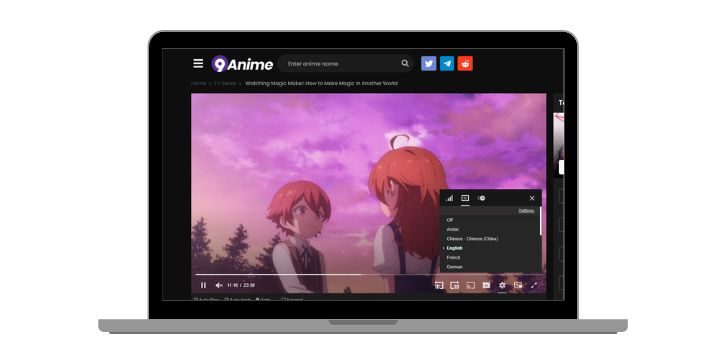
When subtitles are not showing on 9anime, the video plays normally but the text does not appear on the screen.
This problem can look different for each user. Sometimes the subtitle option is missing from the video player. Other times subtitles are turned on but nothing appears. In some cases, subtitles work on one episode but fail on another, or they appear on desktop but not on mobile. These signs usually point to a player, browser, or video server issue rather than a broken video file.
Common Causes of 9anime Subtitles Not Showing
Subtitle problems can come from both the website and your device. The causes below are the most common ones users run into.
- Subtitles turned off inside the video player
- Unsupported or broken video server
- Corrupted browser cache or cookies
- Ad blocker blocking subtitle scripts
- Browser compatibility problems
- Mobile browser limitations
- Temporary subtitle errors on the site
Each cause affects how subtitles load and display.
How to Fix 9anime Subtitles Not Showing
Most subtitle issues can be fixed with simple checks. Try the fixes below one by one and stop when subtitles appear again.
Fix #1: Turn On Subtitles in the Video Player
Sometimes subtitles are simply turned off.
Here are the following steps which help you enable subtitles.
- Play the episode
- Click the settings or CC icon
- Select English subtitles
- Confirm subtitles are enabled
- Resume playback
If subtitles appear, the issue was just a disabled setting.
Fix #2: Switch Video Server
Different video servers handle subtitles differently.
Follow the steps below to change the server.
- Pause the video
- Locate the server list
- Switch to Vidstream or MyCloud
- Reload the episode
- Check subtitle display
Many subtitle issues are server-related.
Fix #3: Refresh the Page and Reload the Episode
Temporary loading errors can hide subtitles.
Refresh the page, wait a few seconds, and reload the episode. This forces the video player to reload subtitle data and often restores missing text.
Fix #4: Clear Browser Cache and Cookies
Old cache files can block subtitle scripts.
You can perform the following steps to clear cache and cookies.
- Open browser settings
- Go to privacy or history
- Select clear browsing data
- Choose cache and cookies
- Restart the browser
After this, reload 9anime and test again.
Fix #5: Disable Ad Blocker or Extensions
Ad blockers sometimes block subtitle loading files.
Try these simple steps to disable extensions.
- Open browser extensions page
- Turn off ad blockers
- Disable other extensions
- Reload the episode
- Check subtitles
If subtitles work, re-enable extensions one at a time.
Fix #6: Try a Different Browser or Device
Some browsers handle embedded players better than others.
Open 9anime on another browser like Chrome, Firefox, or Safari. You can also try a different device such as a phone or tablet. If subtitles appear there, the problem is local to your main setup.
Fix #7: Check Subtitle Availability for That Episode
Not every episode has subtitles uploaded yet.
Some anime episodes may only have raw or incomplete subtitle files. If subtitles are missing across all servers for that episode, the issue is on the source side and not your device.
Fix #8: Use Desktop Mode on Mobile Browser
Mobile browsers may hide subtitle options. Enable desktop mode in your mobile browser and reload the episode. This forces the full video player to load and often brings back subtitle controls.
Fix #9: Wait and Try Again Later
Sometimes subtitle files fail to load temporarily. Wait a short time and try again later. Site-side subtitle issues usually get fixed without user action.
Prevention Tips to Avoid 9anime Subtitle Issues
Small habits help subtitles work more reliably.
- Keep your browser updated
- Clear cache regularly
- Avoid aggressive ad blockers
- Switch servers when subtitles fail
- Use stable internet
- Prefer desktop browsers
- Reload episodes if subs disappear
Conclusion
In short, 9anime subtitles not showing usually comes from player settings, server problems, browser issues, or missing subtitle files. The issue looks serious, but most fixes are quick.
Try each fix calmly and give it time to work. If subtitles are missing for everyone, waiting is the only option. If this guide helped you, share it with other anime fans and leave a comment about which fix worked for you.