Every marketer has a nightmare scenario: You launch a big campaign, check the reports—and your conversions are missing. Yikes. Maybe your checkout event broke. Maybe your thank-you page isn’t firing properly. Whatever it is, you need a fix—and fast.
TL;DR: When your tracking is broken, you need a lightweight tool that can help you troubleshoot quickly. Fortunately, there are tag managers and event-tracking helpers that don’t require a developer every time you sneeze. These 4 tools are trusted by marketers and made for speed. Let’s explore the top picks to fix missing conversions without breaking into a sweat.
1. GTM (Google Tag Manager) Preview Mode + Tag Assistant
Good for: Quick debugging when your conversions aren’t firing in Google Tag Manager.
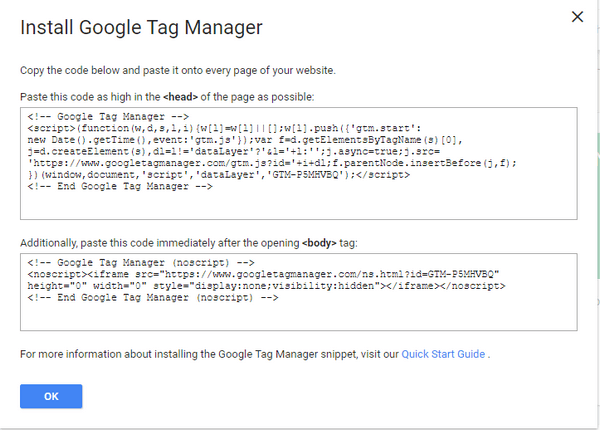
For many marketers, Google Tag Manager is ground zero. But figuring out if a tag fired correctly can feel like a mystery. That’s where GTM’s built-in Preview Mode steps in. With the help of Tag Assistant (a Chrome extension), you can inspect what’s working—or not—on your site in real time.
- See which tags fired on which pages
- Verify if conversion events like ‘purchase’ or ‘lead_submit’ triggered
- Easily spot which tags are broken or missing triggers
Pro tip: GTM Preview Mode lets you see live data without publishing changes. It’s basically a test kitchen for your tracking tags.
2. Stape + Server-side Google Tag Manager Setup Helper
Good for: Fixing messy browser tracking by using server-side tagging.
Browser ad blockers got you down? You’re not alone. Many tags today get zapped by privacy tools and extensions. Enter Stape.io. It’s a sensational lightweight helper that sets up Server-Side GTM with just a few clicks.
This gives you:
- More reliable tracking (less blockable)
- Cleaner data without personal identifiers
- Better compliance with privacy tools
Bonus: It’s shockingly easy to set up. You don’t need to be technical. Just connect your domain, follow the setup wizard, and your server-side container is ready to roll.
Use this when your standard GA4 or Facebook tags randomly stop firing. Or the conversion data is full of holes. Server-side tracking ensures more complete data (even if JavaScript breaks).
3. Visual Tagger by Piwik PRO
Good for: Marketers who want to add simple tags via point-and-click—no code at all!
If you hate messing with code but still care about great tracking, you’ve got to check out Piwik PRO’s Visual Tagger. It’s like GTM’s baby cousin—but easier.

How it works:
- You go to your website inside the visual tagger tool
- You literally click the button or link you want to track
- You choose what kind of event you want to add (scroll, click, form submit)
Voilà! The new tag is live. Piwik PRO handles the messy parts in the background.
Why people love it:
- Fast setup
- No risk of breaking your site
- Perfect for marketing teams without full-time devs
4. Segment Debugger + Tracking Plan Helper
Good for: Businesses using multiple tools and want consistent event naming and complete data.
Segment is a customer data platform. But the real hidden gem? Its built-in event debugger and tracking plan feature.
This combo lets you:
- Track real-time events sent from your website or app
- Spot when expected conversion events are missing
- Keep your whole data dictionary organized
Here’s the magic: The Segment debugger helps you see if “Signup Started” or “Checkout Completed” actually fired. If they didn’t, it tells you why. It’s one of the most transparent ways to keep conversion tracking clean—especially if you send data to many tools like GA, FB Ads, Mixpanel, etc.
Best for: Growth teams with multiple tools and strict data accuracy needs.
Choosing the Right Tool for You
Still unsure what fits? Here’s a quick comparison to help:
| Tool | Best for | Learning Curve | Code Free? |
|---|---|---|---|
| GTM Debug with Tag Assistant | Quick fixes in Google Tag Manager | Medium | No |
| Stape for Server-Side GTM | Reliable long-term, adblock-proof tracking | Low | Mostly |
| Piwik PRO Visual Tagger | No-code click tracking | Very Low | Yes |
| Segment Debugger | Multi-tool data consistency | Medium-High | Mostly |
What to Do When You Spot a Broken Conversion
Step 1: Use the debugger of your choice above to confirm the issue. Did the event fire?
Step 2: Check if the element or page structure has changed recently. This breaks auto-trackers.
Step 3: If in GTM, adjust the trigger or variables. If on Segment, match the expected event name and properties.
Step 4: Test again using preview mode or one of the visual taggers. Don’t just publish and pray!
Step 5: Once the event appears as expected in your analytics platform, document it in a checklist or tagging guide for future changes.
Conclusion: Let Broken Tracking Be a Thing of the Past
Conversion events break. It happens. But now, you don’t have to panic or call three developers just to fix one little tracking bug.
With tools like Visual Tagger, GTM Preview, Stape, and Segment, you have the power to track clean again. Whether you prefer click-based setups or server-side muscle, there’s a lightweight tracking helper calling your name.
So the next time your conversions vanish? Fire up one of these tools, grab a coffee, and get those tags firing again—in minutes.