To view the available Following information for a supported public Instagram account without signing in to Instagram, you can use DolphinRadar’s Instagram Following Viewer. Enter a public username to explore the profiles the tool can currently display, without connecting your personal Instagram account or sharing your Instagram password.
DolphinRadar also gives that first lookup a second purpose: it establishes a reference list. Accounts newly found afterward can appear in Following Updates, helping you distinguish the information available at the start from later discoveries.
For readers who want to understand who a public account follows, this combination provides a useful starting point: browse the available list now, then review what appears afterward. Coverage can vary, and large or restricted accounts may return partial results.
What Does DolphinRadar’s Instagram Following Viewer Show?
An Instagram Following list contains the accounts a profile follows. Its Followers list contains the accounts that follow that profile. DolphinRadar’s Following Viewer focuses on the first of these: the people, creators, brands, and communities a public account follows.
That distinction matters when you have a specific question. A Following count tells you how many accounts a profile follows, but it does not identify those accounts. DolphinRadar helps you look beyond the number by browsing the Following information it can surface.
You might want to explore a creator’s public connections, understand an unfamiliar brand, or discover accounts connected to a particular niche. In each case, seeing identifiable profiles gives you more context than a total alone.
The tool works with supported public accounts. It does not bypass private-account settings or guarantee a complete Following list for every public profile.
Why Use DolphinRadar Without Connecting Instagram?
DolphinRadar’s published lookup workflow does not require you to connect your personal Instagram account, provide your Instagram password, or follow or message the profile you are researching.
This makes it useful when you want to investigate a public username without involving your own Instagram account in the lookup. You can begin with the account you want to check and focus on the available results.
There are three practical reasons to use it:
- Look beyond the Following count. Identify available accounts instead of relying on a number.
- Add context to a public profile. Explore relevant creators, brands, and communities before deciding what to investigate further.
- Establish a starting reference. Use the first check as the basis for reviewing accounts newly found later.
Here, “without logging in” refers to your personal Instagram account. It should not be read as a promise that every DolphinRadar feature has identical registration or access requirements.
How to View an Instagram Following List with DolphinRadar
1. Enter the public Instagram username
Open DolphinRadar’s Instagram Following Viewer and enter the public username you want to check.
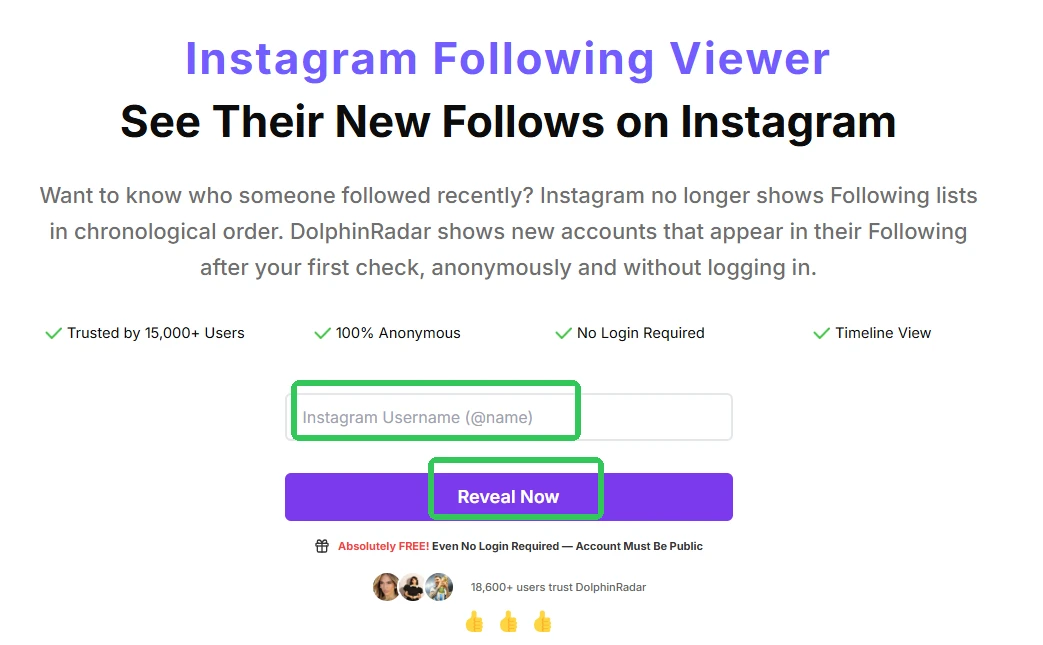
Use the account’s username rather than its display name, and check that you have selected the intended profile. Similar names can otherwise lead you to research the wrong account.
The profile must be public and supported by the tool. A private profile’s Following information remains outside the viewer’s available scope.
2. Browse the available Following profiles
Review the accounts DolphinRadar can currently display for that username.
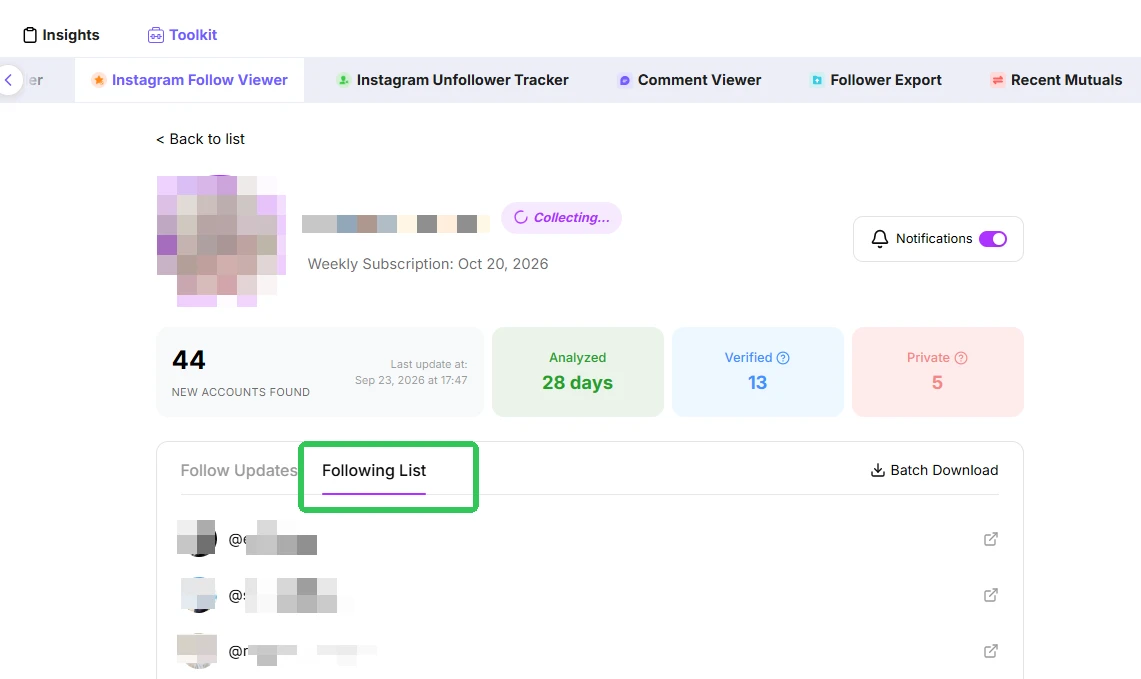
Start with what you actually want to learn. Are you looking for creators in the same niche, brands connected to a particular topic, or communities worth exploring? A clear purpose makes the list easier to use.
For example, if a public creator follows several photography educators, equipment brands, and editing communities, those profiles give you specific places to investigate next. The value comes from identifying relevant accounts and checking their public information.
If results are limited, keep your conclusions limited to the profiles shown. A partial result cannot establish that an account is absent from the full Following list.
3. Treat the first check as your starting reference
Your initial lookup establishes a reference from the Following information available at that point.
This is an essential part of how DolphinRadar’s viewer works. The first list helps you understand what is currently visible and provides a starting point for later comparisons.
It does not reconstruct the order in which those accounts were followed. An account appearing near the top of the initial results should not be described as the profile’s newest follow.
4. Review later Following Updates
After the starting reference exists, accounts newly found afterward can appear in Following Updates.
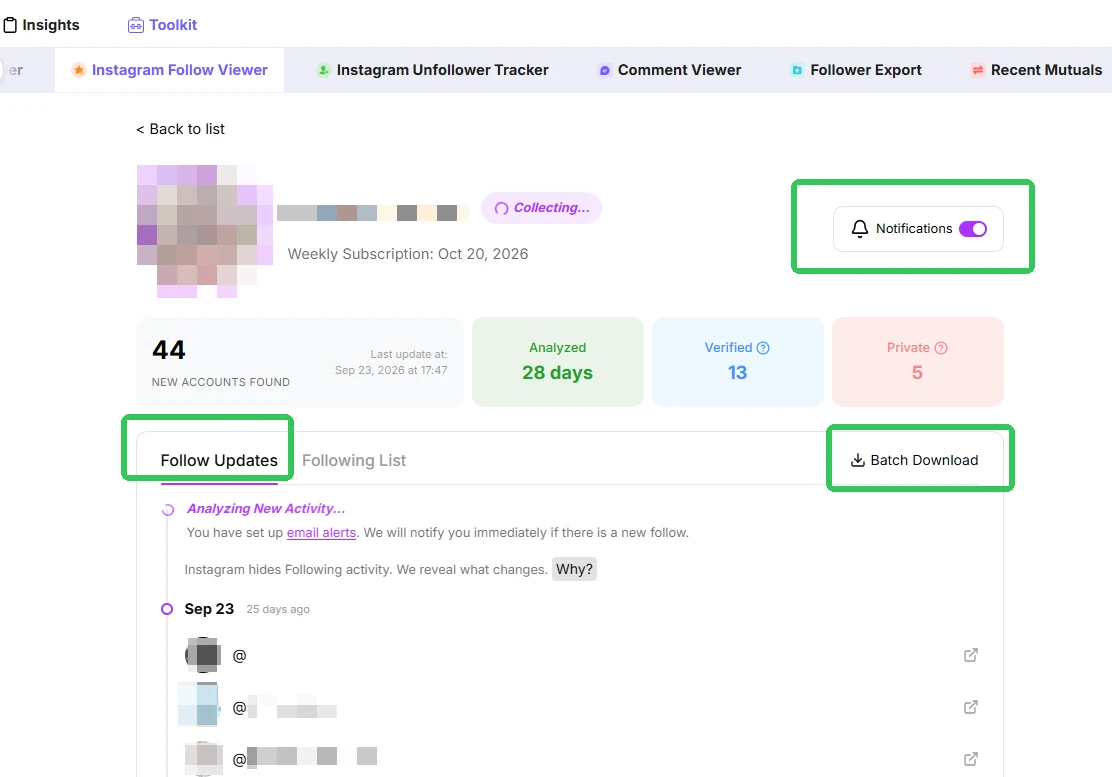
This gives you a separate place to review later discoveries instead of guessing from the position of accounts in the current list.
Interpret these entries as accounts newly found after the reference was created. They do not establish the exact Instagram follow time or provide a guaranteed record of every change. Avoid assuming a particular update schedule unless the current product information confirms it.
Current Following Information vs. Following Updates
DolphinRadar’s two functions answer related questions.
Current Following information answers: “Which accounts can the tool show me for this public profile?”
Following Updates answers: “Which accounts has the tool newly found after my starting reference?”
Keeping those questions separate makes the results more useful.
Suppose a brand already follows a particular creator when you run the first check. That creator belongs to the starting reference; their presence does not prove a recent follow.
If another creator is newly found later and appears in Following Updates, you have a new item to investigate relative to that reference. You still need additional evidence before drawing conclusions about why the brand follows them.
This distinction is especially helpful because the position of an account in an Instagram Following list is not reliable evidence of follow chronology.
A Practical Example: Researching a Creator’s Public Connections
Imagine you run a small online store and want to learn more about a creator before considering outreach.
You enter the creator’s public username in DolphinRadar and browse the available Following profiles. Relevant brands, fellow creators, and niche communities give you a clearer picture of their public connections.
You can then open selected profiles to check their content and relevance to your store. Later Following Updates may provide additional accounts to review.
DolphinRadar’s role is to surface available Following information and later discoveries. A follow alone does not confirm a sponsorship, endorsement, purchase, or willingness to collaborate. Those questions require separate verification.
Who Is DolphinRadar’s Following Viewer Best Suited For?
DolphinRadar suits readers whose starting question is about who a public Instagram account follows.
Individual users can explore accounts connected to a public profile. Creators and brands can identify relevant public connections for further research. Bloggers, store owners, and marketers can use the available list to discover people and communities in their niche.
Its appeal is the combination of an Instagram-password-free lookup, current Following information, and a reference for later Following Updates.
If that matches your task, start with one relevant public username. Browse what DolphinRadar can show, establish your reference, and use later discoveries to guide further research.
FAQ
1. Can I view someone’s Instagram Following list without an Instagram account?
DolphinRadar’s Following Viewer does not require you to connect or sign in with a personal Instagram account. It displays the Following information it can currently surface for supported public profiles.
2. Can DolphinRadar show private Instagram Following lists?
No. The viewer works with supported public profiles and does not bypass private-account visibility settings.
3. Can I see who someone followed most recently?
The first check creates a reference from the available Following information. Accounts newly found afterward can appear in Following Updates. The tool does not reconstruct which existing account was followed most recently before that first check.
4. Does the order of the Following list show when someone followed an account?
No. Current list position is not reliable evidence of follow time. Use the starting reference and later Following Updates to distinguish initial information from subsequent discoveries.