In service-based organizations, every client interaction has a path: an inquiry becomes a consultation, a consultation becomes a proposal, and a signed agreement becomes an active project. Client flow management software helps companies organize, monitor, and improve that journey from the first point of contact to final delivery and follow-up. It gives teams a structured way to manage client movement through different stages while keeping communication, tasks, documents, and data in one place.
TLDR: Client flow management software is a digital system that helps businesses manage the client journey from intake to completion. It improves visibility, reduces manual work, and helps teams deliver a more consistent experience. Common features include client intake forms, workflow automation, scheduling, communication tools, task tracking, and reporting. It is useful for agencies, clinics, consultants, legal firms, financial advisors, and many other service-based businesses.
What Is Client Flow Management Software?
Client flow management software is a platform designed to organize how clients move through a business process. Instead of relying on scattered emails, spreadsheets, paper forms, and informal reminders, teams can use one system to track each client’s status, next steps, assigned staff members, deadlines, and communication history.
The “flow” can look different depending on the business. For a marketing agency, it may include lead capture, discovery calls, proposal approvals, onboarding, campaign planning, reporting, and renewal. For a medical clinic, it may include appointment requests, intake forms, check-in, consultation, treatment planning, billing, and follow-up. In both cases, the software helps prevent clients from being overlooked or delayed.
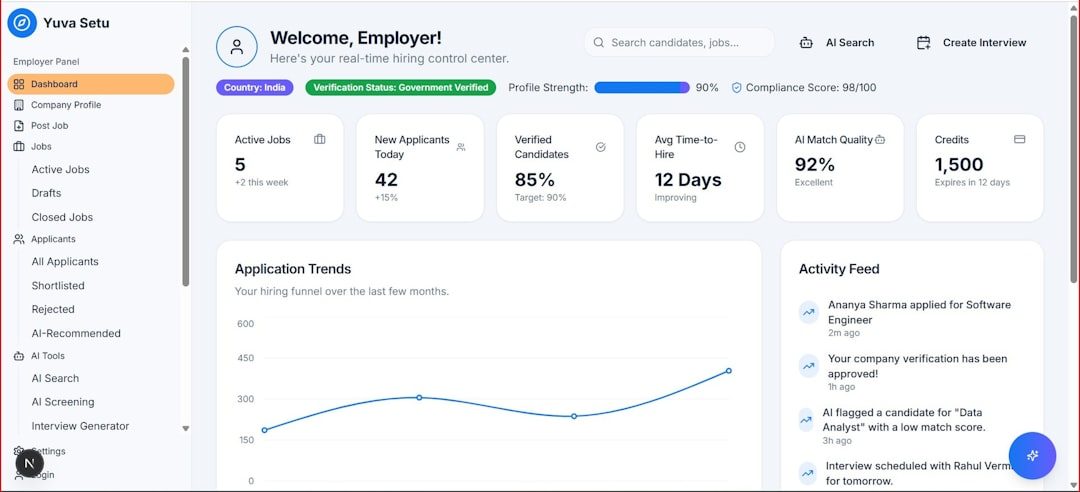
At its core, this type of software gives organizations a clear view of where every client stands, what needs to happen next, and who is responsible for each action. It supports better coordination across departments and makes the client experience more predictable.
Key Features of Client Flow Management Software
While platforms vary by industry and complexity, most client flow management tools include several core features.
1. Client Intake and Data Collection
Intake forms allow businesses to collect essential client information at the beginning of the relationship. These forms may capture contact details, goals, preferences, medical history, project requirements, budget information, or service needs. Digital intake reduces repetitive data entry and helps teams begin with accurate information.
2. Workflow Automation
Automation is one of the most valuable features. The software can automatically assign tasks, send reminders, update statuses, trigger emails, or move clients to the next stage based on predefined rules. For example, once a client signs a contract, the system may automatically create an onboarding checklist and notify the account manager.
3. Scheduling and Appointment Management
Many platforms include built-in scheduling tools or integrations with calendar systems. Clients can book appointments, staff can manage availability, and the system can send confirmation and reminder messages. This reduces no-shows and eliminates back-and-forth scheduling emails.
4. Communication Tracking
A strong client flow management system stores messages, notes, calls, and updates in a central record. This allows staff members to understand the client’s history without searching multiple inboxes. Consistent communication tracking also helps maintain professionalism when team members change or responsibilities shift.
5. Task and Progress Tracking
Task management tools help teams see what is due, what is delayed, and what has been completed. Dashboards, stage views, and checklists make it easier to monitor progress. Managers can identify bottlenecks before they affect the client experience.

6. Document Management
Client work often involves proposals, contracts, consent forms, reports, invoices, and supporting files. Document management keeps these materials organized and accessible. Some systems also support e-signatures, version control, and secure file sharing.
7. Reporting and Analytics
Reporting tools show how efficiently clients move through the process. Businesses can track conversion rates, average response times, completion times, staff workload, missed appointments, and client satisfaction. These insights support better decision-making and process improvement.
Benefits of Client Flow Management Software
Client flow management software provides benefits for both internal teams and clients. Its value often becomes more visible as a business grows and manual coordination becomes harder to maintain.
- Improved organization: All client information, tasks, and communication are stored in one structured system.
- Better client experience: Clients receive timely updates, smoother onboarding, and fewer repeated questions.
- Reduced manual work: Automation handles routine reminders, assignments, and status changes.
- Greater accountability: Team members can see who owns each task and when it is due.
- Fewer missed opportunities: Leads and active clients are less likely to fall through the cracks.
- Faster service delivery: Standardized workflows help teams complete work more efficiently.
- Stronger reporting: Managers gain data on performance, capacity, and client movement.
Another major advantage is consistency. When every client follows a clear process, the business can deliver a more reliable standard of service. This is especially important for organizations with multiple employees, locations, or service lines.
Common Use Cases
Client flow management software is used across many industries, particularly where client relationships involve multiple steps, approvals, or appointments.
Professional Services
Consultants, accountants, legal firms, and financial advisors use the software to manage inquiries, consultations, document requests, client approvals, and ongoing service tasks. It helps ensure that deadlines and compliance-related steps are not missed.
Healthcare and Wellness
Clinics, therapists, dental practices, and wellness centers use client flow tools for scheduling, intake forms, treatment stages, follow-ups, and billing coordination. Secure information handling is especially important in these environments.
Agencies and Creative Teams
Marketing agencies, design studios, and development firms use the software to move clients through discovery, proposal, onboarding, production, review, approval, and reporting. It supports collaboration between account managers, creatives, strategists, and clients.

Education and Training Providers
Training companies, tutoring centers, and coaching programs manage student or client enrollment, assessments, session scheduling, progress tracking, and completion certificates. The software can help maintain a personalized experience at scale.
Real Estate and Property Services
Real estate agencies, property managers, and home service providers use client flow management for lead intake, appointments, inspections, quotes, approvals, and service completion. Clear workflows help coordinate multiple parties and time-sensitive tasks.
How Businesses Choose the Right Platform
When evaluating client flow management software, organizations typically consider the complexity of their process, the number of users, integration needs, security requirements, and budget. A simple business may only need intake forms, scheduling, and task tracking. A larger organization may need advanced automation, permission controls, reporting dashboards, and integrations with billing or customer relationship management systems.
The best platform should be easy for staff to adopt and flexible enough to match existing workflows. If software is too rigid, teams may struggle to use it consistently. If it is too complex, adoption may slow down. A practical approach is to map the current client journey first, identify pain points, and then choose a system that solves those specific problems.
FAQ
What is the main purpose of client flow management software?
The main purpose is to help businesses manage clients through each stage of a service process. It improves organization, communication, accountability, and overall client experience.
Is client flow management software the same as CRM software?
Not exactly. A CRM focuses heavily on managing relationships, sales activity, and contact records. Client flow management software focuses more on the operational journey clients follow after initial contact, although some platforms combine both functions.
Which businesses need client flow management software?
Any service-based business with repeated client steps can benefit. This includes agencies, clinics, consultants, law firms, financial advisors, coaching businesses, training providers, and real estate companies.
Can small businesses use client flow management software?
Yes. Small businesses often benefit because the software reduces administrative work and helps maintain a professional client experience without requiring a large operations team.
What should a business look for in a client flow platform?
A business should look for easy workflow customization, automation, scheduling, communication tracking, reporting, secure data handling, and integrations with tools already used by the team.