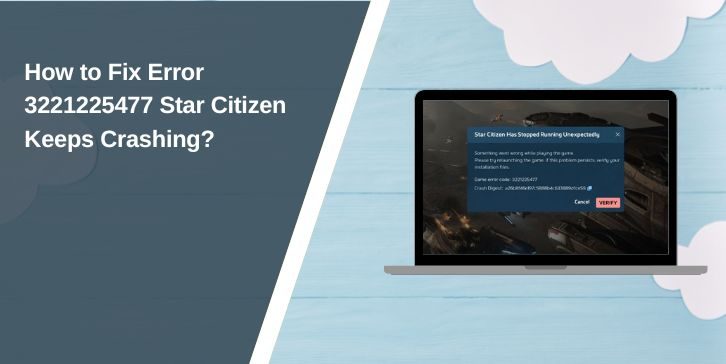
Seeing error 3221225477 in Star Citizen can stop the game before it even loads. You click launch, the screen freezes for a moment, then the game closes without a clear message. This usually happens during startup or while loading into the universe. The error looks confusing, but in most cases it comes from system or game conflicts, not from your account.
This guide explains what the error means, why it happens, how to fix it step by step, and how to avoid it later.
What Is Error 3221225477 in Star Citizen?
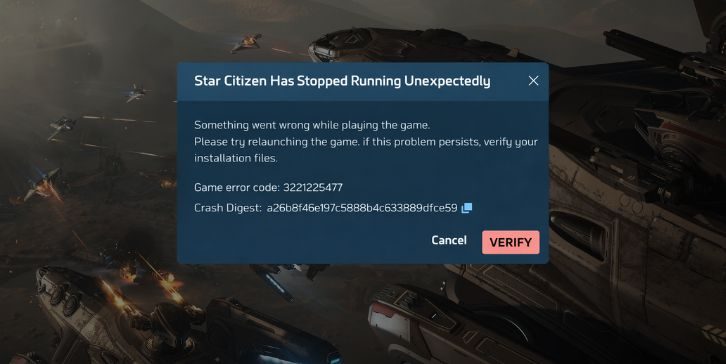
Error 3221225477 is a Windows-level crash code. It means the game process ended unexpectedly because something blocked normal execution. Star Citizen is a heavy game that uses large memory blocks, graphics resources, and background services. When Windows denies access to memory, files, or required services, the game exits and shows this code. The error is not specific to one single issue inside the game.
Most players see this error during launch, on the loading screen, or when entering the Persistent Universe. Sometimes the launcher stays open while the game closes. Other times everything shuts down at once. The crash usually happens before gameplay begins.
Common Causes of Error 3221225477
This error usually comes from system conflicts rather than one broken file. Below are the most common causes seen by players.
- Virtual memory or page file disabled
- Corrupted Star Citizen game files
- Graphics driver crash or mismatch
- Anti-cheat or launcher conflict
- Antivirus or firewall blocking game files
- CPU or GPU overclock instability
- Corrupted shader cache
- Background software interference
How to Fix Error 3221225477 in Star Citizen?
Start with simple fixes first. Many players solve this without reinstalling the game. After each fix, try launching again before moving on.
Fix #1: Restart the System and Close Background Apps
This error can happen when memory is already under pressure.
Here are the following steps which help you do this:
- Restart your computer
- Do not open extra apps after login
- Close browsers, overlays, and launchers
- Launch Star Citizen directly
- Check if the error returns
This clears temporary memory conflicts.
Fix #2: Enable or Increase Virtual Memory
Star Citizen relies on virtual memory even if you have enough RAM. Follow the steps below to easily adjust it:
- Open Windows system settings
- Go to advanced performance options
- Enable automatic page file or set a custom size
- Apply changes and restart
- Launch the game again
A disabled page file is a common trigger.
Fix #3: Verify Star Citizen Game Files
Corrupted files can crash the game during loading. You can perform the following steps to verify files:
- Open the RSI Launcher
- Go to game settings
- Start file verification
- Wait for the process to finish
- Restart the launcher and retry
This replaces missing or damaged data.
Fix #4: Update or Reinstall Graphics Drivers
Graphics driver issues often cause silent crashes.
Below are the steps that will guide you:
- Check your current GPU driver version
- Download the latest driver from the official source
- Install it cleanly
- Restart the system
- Launch the game again
Star Citizen stresses the GPU heavily, so drivers matter.
Fix #5: Delete the Shader Cache Folder
Corrupted shaders can crash the game during loading. Here’s how you can do this:
- Close the launcher
- Locate the shader cache folder
- Delete the contents, not the game
- Restart the launcher
- Let the game rebuild shaders
The first launch may take longer after this.
Fix #6: Disable Overclocking and Performance Tweaks
Overclocked systems may look stable but fail under load.
This fix does not require steps. If your CPU or GPU is overclocked, return it to default settings. Star Citizen pushes hardware hard, and unstable clocks often trigger crash codes like this one.
Fix #7: Temporarily Disable Antivirus and Firewall
Security software can block game files silently. Try these steps carefully:
- Temporarily disable real-time protection
- Launch Star Citizen
- Check if the game loads
- Re-enable protection afterward
If this works, add the game to exclusions. Do not leave protection off.
Fix #8: Run the Launcher and Game as Administrator
Permission issues can block memory or file access.
Run both the launcher and game as administrator. This allows Windows to grant required permissions. Many players fix error 3221225477 with this step alone.
Prevention Tips to Avoid Error 3221225477
Good habits reduce repeat crashes.
- Keep virtual memory enabled
- Update drivers after major patches
- Avoid heavy background apps
- Clear shader cache after updates
- Do not overclock aggressively
- Add the game to antivirus exclusions
- Restart before long play sessions
Conclusion
In short, error 3221225477 in Star Citizen means the game crashed due to a system-level conflict. The cause is often memory, drivers, permissions, or background software, not your account or character. Most players fix it by adjusting virtual memory, repairing files, or clearing cache.
Work through the fixes one by one and test after each step. If the error keeps happening, reaching out to Cloud Imperium Games support is the next safe move.
If this article helped you, share it and leave a comment about which fix worked for you.