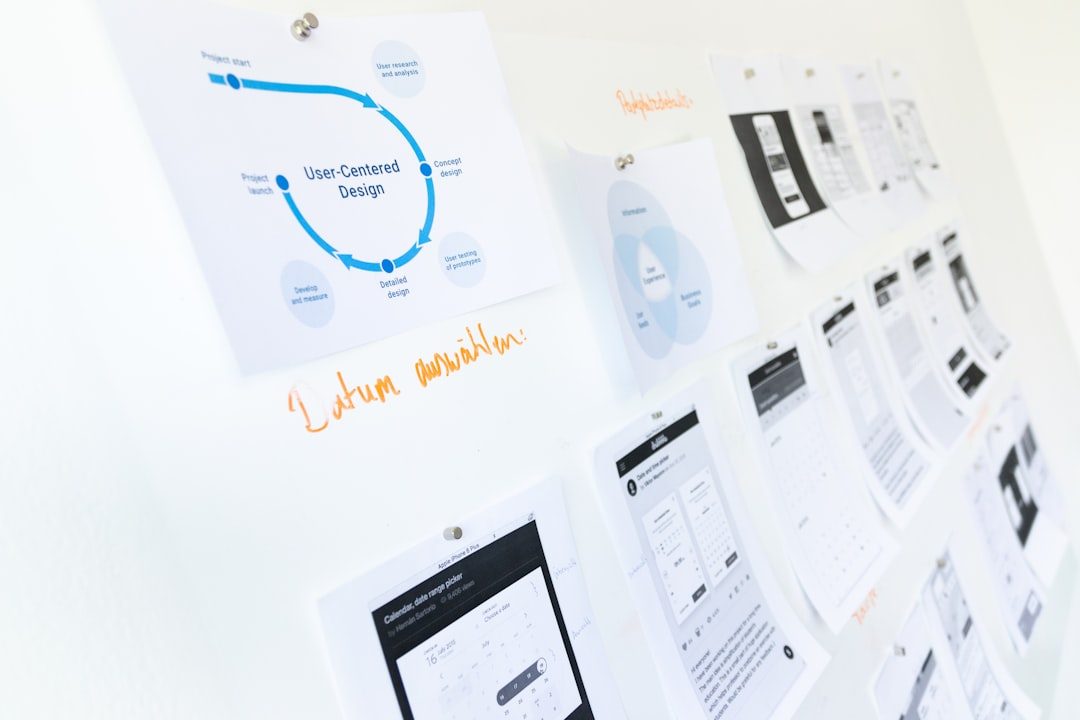
Design teams are under constant pressure to deliver higher-quality work, faster feedback cycles, and more consistent brand experiences across many channels. Artificial intelligence can help, but only when it is used as part of a disciplined workflow rather than as a shortcut for design judgment. The most productive teams treat AI tools as assistants for exploration, documentation, automation, and analysis, while keeping human designers responsible for strategy, taste, accessibility, and final decisions.
TLDR: AI tools can boost design team productivity by accelerating research synthesis, idea generation, prototyping, image creation, content drafting, and project coordination. The most useful tools are those that integrate into existing workflows, support collaboration, and reduce repetitive work without weakening design quality. Teams should evaluate AI tools based on security, accuracy, usability, and how well they support human decision-making. The strongest results come from combining AI assistance with clear design standards and experienced review.
Why AI Matters for Design Productivity
Design productivity is not simply about producing more screens, graphics, or assets. A productive design team makes better decisions with less waste. That often means reducing time spent on repetitive tasks, improving communication between disciplines, and giving designers more room for deep creative thinking. AI can contribute to all of these goals, especially when it is applied to the parts of the workflow that typically slow teams down.
For example, designers often lose valuable hours summarizing user interviews, resizing assets, writing presentation notes, searching for references, or preparing design variations for review. These tasks are necessary, but they are not always the best use of senior creative attention. AI tools can help teams move faster by generating first drafts, organizing information, identifying patterns, and automating mechanical production work.
The key is to use AI as a productivity layer, not as a replacement for design thinking. A tool may produce a layout, mood board, or illustration quickly, but the team still needs to judge whether it suits the brand, solves the user problem, and meets accessibility and usability standards.
1. AI Tools for Research and Insight Synthesis
Strong design begins with understanding users, markets, and business constraints. Research synthesis can be time-consuming, especially when teams are reviewing interview transcripts, survey responses, support tickets, or usability testing notes. AI research tools can help by summarizing large volumes of qualitative data, clustering themes, and extracting recurring pain points.
Tools such as Dovetail, Notion AI, Condens, and ChatGPT Enterprise can assist with:
- Summarizing interview transcripts and research notes
- Identifying common user frustrations or requests
- Drafting personas or journey map inputs
- Creating concise research summaries for stakeholders
- Turning raw notes into structured opportunity areas
Used carefully, these tools can reduce the time between research collection and design action. However, teams should be cautious about treating AI summaries as final truth. AI can miss nuance, overemphasize repeated phrases, or flatten emotional context. A reliable workflow includes human validation, direct review of primary evidence, and clear traceability from insights back to source material.

2. AI for Ideation and Concept Exploration
Early-stage design often benefits from breadth. Teams need to explore multiple directions before narrowing toward the strongest solution. AI tools can speed up ideation by producing prompts, visual references, alternative layouts, headline options, naming directions, or feature concepts. This can be especially useful when teams feel stuck or need to quickly prepare material for workshops.
Tools such as ChatGPT, Claude, Microsoft Copilot, and Gemini are useful for text-based ideation. Designers can ask these tools to generate design principles, product positioning angles, onboarding flow ideas, or workshop exercises. Meanwhile, image-generation tools such as Midjourney, Adobe Firefly, and DALL E can help teams explore mood, style, texture, and visual direction.
These tools are particularly effective for creating starting points. A design team might ask an AI model to generate ten different ways to communicate trust in a financial app, or to suggest visual metaphors for sustainability, speed, or simplicity. The output may not be final, but it can help the team avoid the blank-page problem and move into critique more quickly.
To keep ideation productive, teams should develop clear prompts that include the audience, brand personality, constraints, format, and desired tone. For example, a vague prompt such as “make ideas for a landing page” will produce generic results. A stronger prompt explains the target user, product value, brand voice, conversion goal, and what must be avoided.
3. AI in UI Design and Prototyping
AI is increasingly present in interface design tools. Platforms such as Figma, Framer, Uizard, Galileo AI, and Visily can help create interface drafts, generate simple prototypes, convert text prompts into layouts, or transform sketches into wireframes. These tools can be useful when teams need to visualize ideas quickly or compare structural options before committing to detailed design.
For product teams, this can be a substantial productivity gain. Instead of spending hours constructing a basic wireframe from scratch, a designer can generate a rough structure, refine the hierarchy, and focus attention on interaction quality. Product managers and stakeholders can also use AI-assisted prototyping tools to communicate early concepts more clearly, reducing ambiguity before design work begins.
However, AI-generated interfaces should be reviewed with discipline. Many generated layouts look polished but may have weak information architecture, poor accessibility, inconsistent spacing, or unclear user flows. Designers should treat these outputs as draft material. The final product still requires professional judgment, usability testing, design system alignment, and technical feasibility checks.
4. AI for Visual Asset Creation
Design teams often need supporting visuals: backgrounds, icons, illustrations, campaign imagery, presentation graphics, social media assets, and concept mockups. AI image tools can dramatically speed up production of these materials, particularly during exploration and internal communication.
Adobe Firefly is especially relevant for teams already working in Adobe Creative Cloud because it integrates with tools such as Photoshop and Illustrator. Features like generative fill, image extension, and text-to-image generation can save time when adjusting compositions or creating campaign variations. Midjourney is widely used for high-quality concept visuals and stylistic exploration, while DALL E is useful for prompt-based image creation and quick visual experimentation.
Common productive uses include:
- Creating mood board imagery for early creative direction
- Generating placeholder visuals for prototypes and presentations
- Extending or adapting image compositions
- Exploring illustration styles before commissioning final artwork
- Producing multiple campaign concepts for internal review
Teams should also consider licensing, brand safety, and originality. Not every AI image tool provides the same commercial assurances. Serious design organizations should define rules for when AI-generated assets can be used publicly, when they are only for internal concepts, and when legal or brand review is required.
5. AI for Design Systems and Documentation
Design systems improve consistency, but maintaining them can be demanding. Components need documentation, usage rules, accessibility notes, naming conventions, and change logs. AI writing and documentation tools can help teams keep design systems clearer and more current.
Tools such as Notion AI, Confluence with Atlassian Intelligence, Zeroheight, and general-purpose language models can assist with drafting component descriptions, summarizing updates, turning meeting notes into documentation, and creating more understandable guidelines for cross-functional teams.
For example, after a design system team updates a button component, AI can help draft release notes explaining what changed, why it matters, and how product teams should adopt the update. It can also help translate technical documentation into plain language for designers, marketers, and stakeholders.
This is a practical productivity improvement because weak documentation often causes repeated questions, inconsistent implementation, and avoidable rework. AI does not eliminate the need for ownership, but it can make documentation easier to produce and maintain.
6. AI for Content, UX Writing, and Communication
Design teams frequently need words: interface labels, empty states, onboarding messages, error messages, presentation narratives, survey questions, and stakeholder updates. AI writing tools can help create first drafts and variations, especially when the team needs to test tone or compare concise alternatives.
ChatGPT, Claude, Writer, Jasper, and Grammarly can support UX writing and design communication. They can help convert technical language into user-friendly copy, shorten long explanations, create tone variations, and check for clarity. For organizations with strict brand voice requirements, enterprise writing tools can be configured with style guidelines and approved terminology.
Good UX writing still requires context. An AI tool may produce polished copy that is not appropriate for the user’s emotional state or the specific product moment. Designers and content specialists should review AI-generated copy for clarity, accessibility, legal accuracy, and tone.
7. AI for Workflow Automation and Task Management
Beyond creative tasks, AI can improve the operational side of design. Project updates, meeting summaries, task assignments, file organization, and stakeholder follow-ups can consume a surprising amount of team capacity. AI-enabled productivity platforms such as Asana Intelligence, Monday AI, ClickUp AI, Slack AI, and Microsoft Copilot can help teams stay organized.
These tools can summarize long conversations, identify action items, draft project updates, and surface relevant information from past discussions. In distributed teams, this is particularly valuable because important design decisions are often spread across chats, documents, comments, and meeting recordings.

When used well, AI workflow tools reduce coordination friction. Designers spend less time searching for context and more time making progress. The most effective teams still maintain good communication habits: clear ownership, structured project spaces, documented decisions, and regular critiques.
How to Choose the Right AI Tools
Not every AI tool will be worth adopting. A serious design team should evaluate tools through a practical framework rather than chasing novelty. The best tools solve real workflow problems, integrate with existing systems, and meet organizational requirements for security and governance.
Important evaluation criteria include:
- Workflow fit: Does the tool reduce friction in an existing process?
- Output quality: Are the results consistently useful, or do they require too much correction?
- Collaboration: Can multiple team members review, edit, and share outputs easily?
- Data privacy: How does the vendor handle uploaded files, prompts, and confidential information?
- Brand control: Can the tool follow brand guidelines, tone, and visual standards?
- Accessibility support: Does it help maintain inclusive and usable design?
- Cost and scalability: Is the productivity gain worth the subscription and training cost?
It is wise to start with a pilot. Select one or two common pain points, test a small number of tools, measure time saved, and gather feedback from designers, researchers, content specialists, and product partners. This produces a more reliable adoption decision than relying on vendor promises or isolated demos.
Best Practices for Responsible Use
AI can increase speed, but speed without standards can create risk. Design leaders should establish clear guidelines for how AI may be used. These guidelines should address confidentiality, approved tools, review requirements, asset usage, accessibility, and disclosure expectations.
A mature AI design workflow usually includes:
- Human review before any AI-generated work is published
- Clear labeling of AI-assisted concept material during reviews
- Restrictions on uploading sensitive customer or business data
- Accessibility checks for all AI-assisted interface work
- Brand and legal review for public-facing generated assets
- Shared prompt libraries for repeatable, high-quality results
The goal is not to slow teams down with bureaucracy. The goal is to ensure that productivity gains do not create quality, ethical, or legal problems later.
Conclusion
AI tools can meaningfully boost productivity in design teams by accelerating research synthesis, ideation, prototyping, visual production, writing, documentation, and project coordination. The strongest value comes from tools that remove repetitive work and help teams make informed decisions faster.
Still, AI is not a substitute for design leadership, user empathy, craft, or strategic judgment. The most effective teams use AI to expand capacity while maintaining rigorous standards. When adopted thoughtfully, AI becomes a dependable partner in the design process: fast enough to reduce operational drag, flexible enough to support creative exploration, and useful enough to give designers more time for the work that truly requires human expertise.